How to perform App Gateway Standard Checking for Customers in China
In the case of any issue with the Safous App Gateway, the Safous support team will require you to perform some standard checking in the App Gateway and collect the log files and screenshots.
Once collected, please compress it into a zip file and attach it with your inquiry mail. These logs and screenshots will help the support team investigate the root cause and troubleshoot faster.
Before proceeding, please ensure that you have fulfilled the requirement for App Gateway written here.
This procedure is suitable only for environments in China.
Checking on the App Gateway Side
- Login via SSH to your App Gateway using an account with sudo privilege.
- Ensure that you set up your favorite SSH client to record the output of the session
- Execute the following command to perform the standard checking.
-
Connectivity check
For the "telnet" command, press "Ctrl + ']' " after the result shows, then type in "quit" and hit Enter.ping -c 10 repo.safous.cntelnet repo.safous.cn 443dig tcp.ztna.safous.cnopenssl s\_client -connect <dig result of tcp.ztna.safous.cn>:443 -servername tcp.ztna.safous.cntelnet cert-gen.ztna.safous.cn 443 -
Operating system requirement check
cat /etc/\*release\*ufw statusdf -hlsblkfree -mcat /proc/cpuinfodatesudo crontab -lcat /var/log/cron.logntpq -pn -
Container check
For the "docker stats" command, press "Ctrl + C" after 5 seconds of running.docker ps -adocker imagescat /etc/cyolo/config/docker-compose.ymldocker logs config-idac-1docker stats config-idac-1 -
SSL certificate check
ls -lha /etc/cyolo/certsls -lha /etc/safous/certsopenssl x509 -noout -in /etc/cyolo/certs/cert.pem -textopenssl x509 -noout -in /etc/cyolo/certs/cert.pem -subject -datesopenssl x509 -noout -in /etc/safous/certs/cert.pem -textopenssl x509 -noout -in /etc/safous/certs/cert.pem -subject -datescat /etc/safous/tools/certbot-renew.sh -
Files check
ls -lha /etc/cyolo/ls -lha /etc/safous/cat /etc/safous/.configcat /etc/safous/.serial
-
Checking on the Admin Portal Side
- Login to https://portal.safous.cn/ using your Safous Admin credentials
- Navigate to Settings > Configuration > Sites
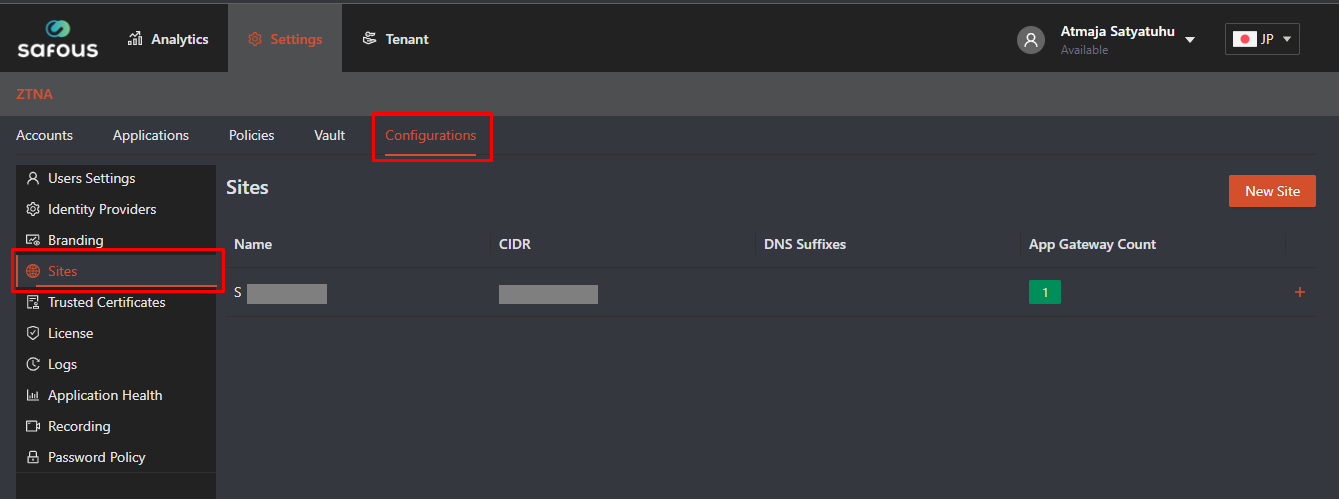
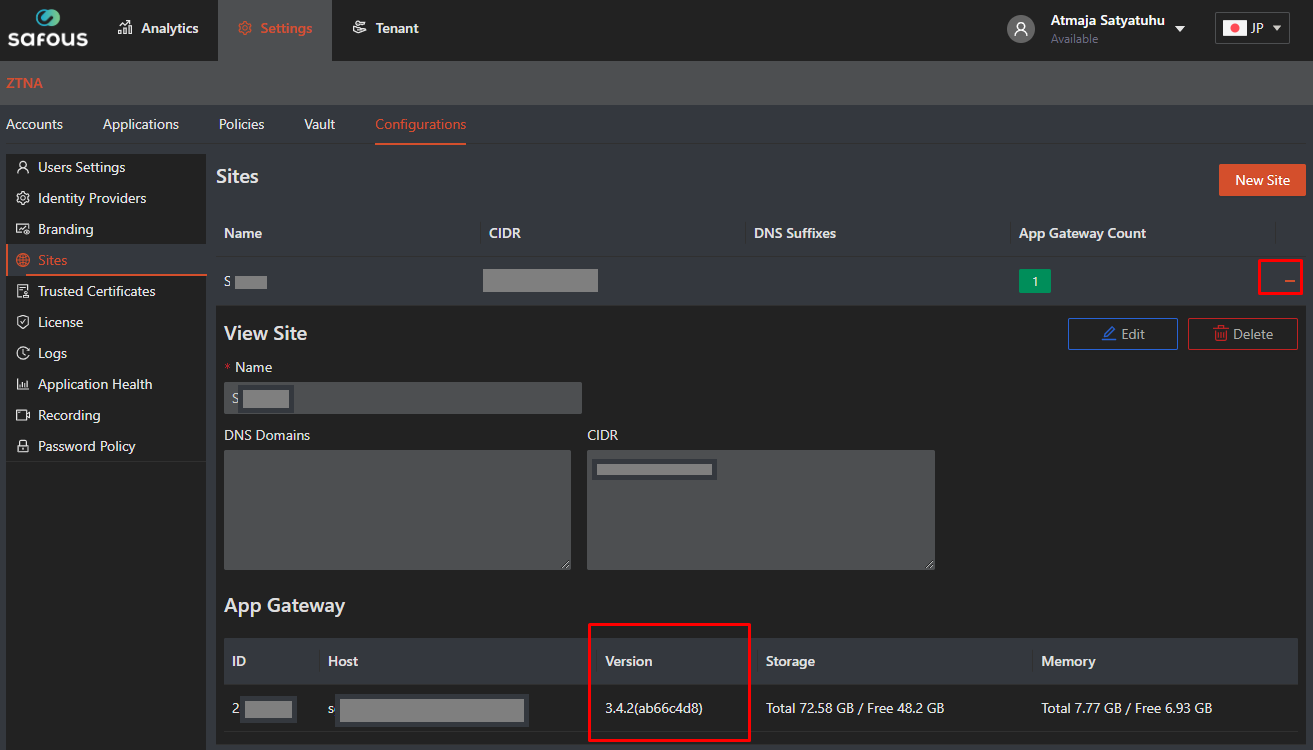
- Expand the installed sites configuration, it should show the App Gateway version.
Screenshot the screen.
After you have collected all relevant logs and screenshots, please compress them into a zip file, then attach it to your inquiry mail to the support team.