How to Change Safous Domain Tenant
If there's a customer who wants to change their existing domain into a new domain, please follow these steps.
Before we start, please make sure you did these steps beforehand:
- Contact Safous Sales Team and get the approval to use custom domain for your tenant.
- Contact support@safous.com beforehand, because there's a step that needs to be done by Safous L2 Team.
Preparation Phase
Before proceeding to change the domain, there are several things that need to be done from customer side:
- Make sure if user portal is working normally.
- Access customer's user portal.
- Access several applications.
- Cut off all user access.
- Access admin portal.
- https://portal.safous.com/ for non-China tenants.
- https://portal.safous.cn/ for China tenants.
- Login using admin account, and go to Settings > ZTNA > Accounts > Users. Proceed to disable all users in the customer's tenant.
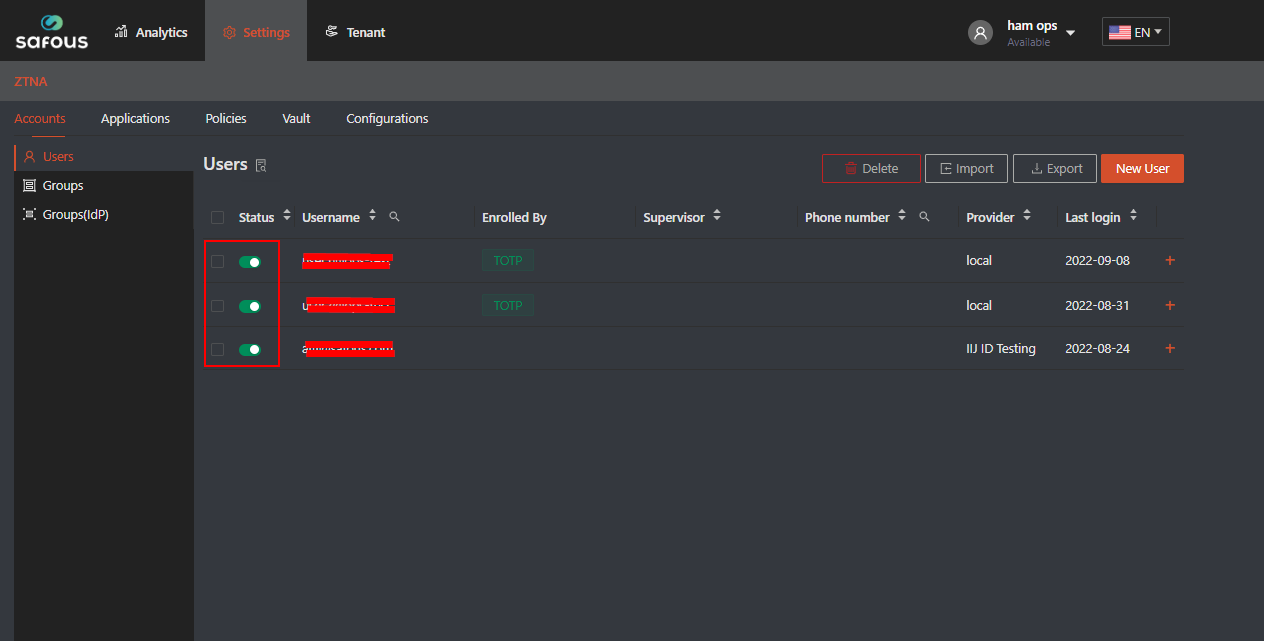
- Access admin portal.
- Check App Gateway container log
- Go to you App Gateway VM
- Check IDAC container's log
See if IDAC can served traffic normally by looking for accepting connections from upstream status in the log.docker logs -f config-idac-1

If the preparation phase has been completed, we can move on into the implementation phase.
Implementation Phase
-
Back up cyolo, safous, and blobs directory
- Cyolo directory
cp -ipa /etc/cyolo /etc/cyolo-backupls -lah /etc/cyolo-backup
- Safous directory
cp -ipa /etc/safous /etc/safous-backupls -lah /etc/safous-backup
- Blobs directory
cp -ipa /blobs /blobs-backupls -lah /blobs-backup
- Cyolo directory
-
Check existing SSL certificate
- Check if there are cert files in /etc/cyolo/certs
cd /etc/cyolo/certs
- Check whether your SSL certificate is still valid or not
openssl x509 -noout -subject -dates -in cert.pem
- If the SSL Certificate is not valid, please follow this KB to update your SSL certificate manually.
- Check if there are cert files in /etc/cyolo/certs
-
Change End Point and Reconfigure SSL certificate server.
This task will be done by Safous L2 Team , please communicate with our Safous Support. For us to support, please provide us with your domain token. You can obtain this information by doing this command:cat /etc/safous/.config -
Get new certificate
- Change domain from CERT_AUTH in .config file (from old domain to the new domain)

- Get new certificate for your new domain
-
Copy the value of CERT_AUTH in .config file that you just updated with the new domain.
-
Define CERT_AUTH variable
Input CERT_AUTH value you copied before. Example:
CERT_AUTH=<NEW DOMAIN>:xxxxxxxxxxxxxxxxxxxxxxxxxxxxxxxxxxxxxxxxxxxxxxxxxxxxxxxxxxxxxxxxTo make sure if it was successfully defined, run this command and make sure it echo the same value as what you inputted.
echo $CERT_AUTH -
Generate new certificate
mkdir /tmp/safous-certs && cd /tmp/safous-certsFor China tenants:
sudo bash < <( curl -s -u "$CERT\_AUTH" https://cert-gen.ztna.safous.cn/cert.cgi)For non-China tenants:
sudo bash < <( curl -s -u "$CERT\_AUTH" https://cert-gen.ztna.safous.com/cert.cgi)Check whether the SSL certificate has been successfully generated or not.
ls -lah /tmp/safous-certs -
Check if the new certificate is valid
openssl x509 -in /tmp/safous-certs/cert.pem -noout -dates -subject -
Copy certificate files for the new domain into cyolo directory
cp /tmp/safous-certs/cert.pem /etc/cyolo/certs/cert.pemcp /tmp/safous-certs/key.pem /etc/cyolo/certs/key.pemls -lah /etc/cyolo/certs
-
- Change domain from CERT_AUTH in .config file (from old domain to the new domain)
-
Recreate IDAC container
- Recreate IDAC container
docker-compose -f /etc/cyolo/config/docker-compose.yml up -d
- Check if IDAC is working normally and able to serve traffic.
See if IDAC can served traffic normally by looking for accepting connections from upstream status in the log.docker-compose -f /etc/cyolo/config/docker-compose.yml logs -f
- Recreate IDAC container
-
Change domain mapping
docker exec -it config\_idac\_1 ./idac tinker sql exec \\"UPDATE mappings set domain = (SELECT id FROM domains WHERE name = '_**<NEW DOMAIN>**_');"docker exec -it config\_idac\_1 ./idac tinker sql exec \\"DELETE from domains where id= (SELECT id FROM domains WHERE name = '_**<OLD DOMAIN>**_');"
After the implementation phase, you can proceed to the verification phase.
Verification Phase
- Make sure if user portal is working normally.
- Access customer's user portal.
- Access several applications.
it may take several minutes for user portal to become accessible.
If customer's user portal is working normally, you can proceed to enable all users.
- Login using admin account, and go to Settings > ZTNA Accounts > Users. Proceed to enable all users in the customer's tenant.
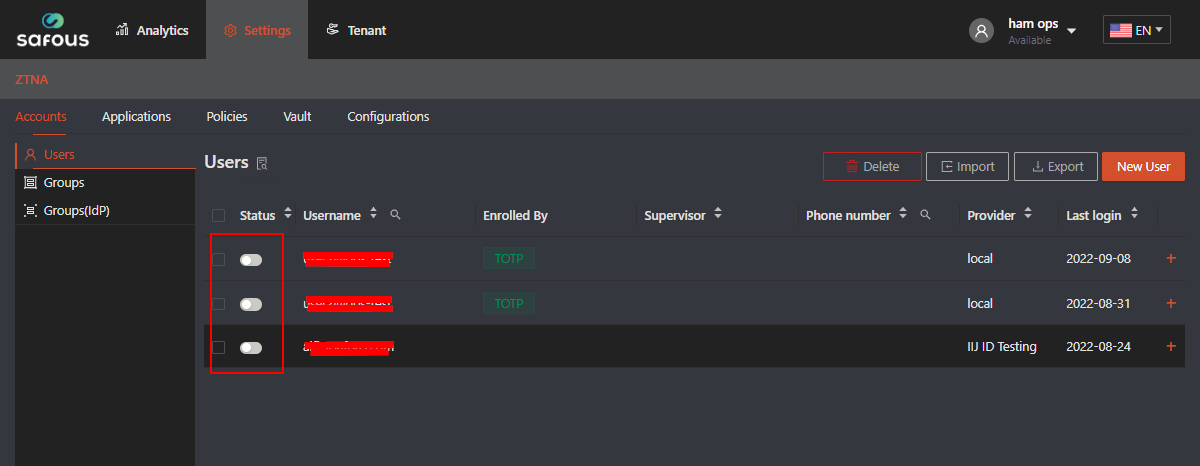
Rollback
If customer's user portal doesn't work, please follow these steps.
Please make sure you don't mistakenly delete the backup file for the first step.
-
Stop existing container
- IDAC containers
sudo docker-compose -f /etc/cyolo/config/docker-compose.yml stop
- IDAC containers
-
Rollback cyolo, safous, and blobs directory
- Cyolo directory
rm -rf /etc/cyolocp -ipa /etc/cyolo-backup /etc/cyolo
- Safous directory
rm -rf /etc/safouscp -ipa /etc/safous-backup /etc/safous
- Blobs directory
rm -rf /blobscp -ipa /blobs-backup /blobs
- Cyolo directory
-
Check IDAC container log
docker-compose -f /etc/cyolo/config/docker-compose.yml logs -fSee if IDAC can served traffic normally by looking for accepting connections from upstream status in the log.
-
Access customer's user portal again
- Access customer's user portal.
- Access several applications.
Clean up
After you successfully conducted the implementation and verification phase or rollback process, please clean up the backup data created in the early phase.
rm -rf /etc/cyolo-backup

rm -rf /etc/safous-backup

rm -rf /blobs-backup
If you have any troubles during domain migration process, please contact support@safous.com right away to get help with Safous Support.