Networks
Safous ZTNA offers a "Networks" application where customers can make some sort of network "routes" that can be reached by the end-user that are using Safous Agent to access internal or public resources through the App Gateway address.
Navigate to Settings > ZTNA > Applications > Networks
Several columns and buttons will appear as follows:

-
New Network: Click this button to register a new network application.
-
Search field: Search for a network application by its name.
-
Status: Shows the status of the application, whether it is on (enabled) or off (not enabled).
-
Name: Shows the name of the network application.
-
FQDN/IP Address/CIDR: Shows all the FQDN/IP address/CIDR of the network application.
-
TCP Ports: Shows the list of TCP ports to be opened and accessed for the application. Can be defined with a port range, or use a comma (,) as a delimiter.
-
_UDP Port_s: Shows the list of UDP ports to be opened and accessed for the application. Can be defined with a port range, or use a comma (,) as a delimiter.
-
Category: Shows the list of categories associated with the network application.
-
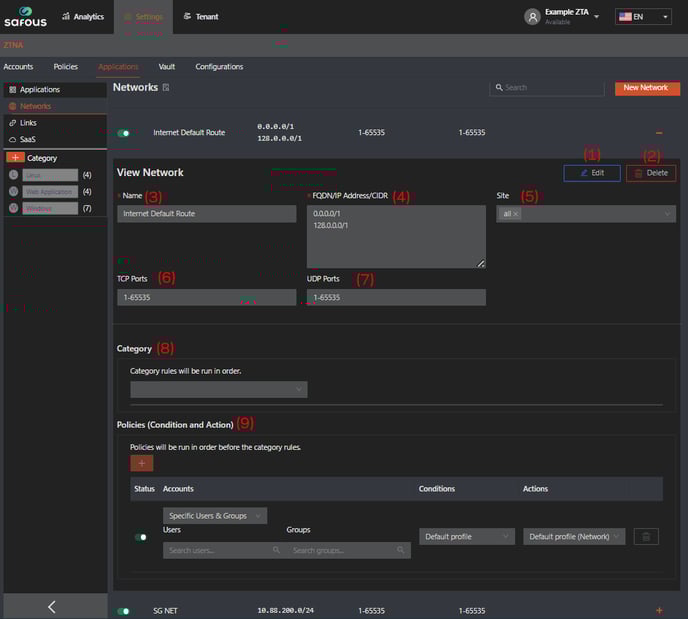
Expand/Shrink Button: A '+' button to expand and a '–' button to shrink the network application's detailed information. Clicking the + button will show several configuration parameters as follows:
-
Edit button: Allow modification of the network application's configuration.
-
Delete button: Delete the network application.
The following parameters also need to be defined during a new network application registration:
-
Name: Name of the network application.
-
FQDN/IP Address/CIDR: Address of the application. Enter a new line as a delimiter for each address.
-
Site: Select the list of sites where the application should be published and accessed.
-
TCP Ports: Define the list of TCP ports to be opened and accessed for the application. Can be defined with a port range, or use a comma (,) as a delimiter.
-
UDP Ports: Define the list of UDP ports to be opened and accessed for the application. Can be defined with a port range, or use a comma (,) as a delimiter.
-
Category: Select the list of categories to associate with the application.
-
Policies (Condition and Action): Define the policy to be applied to the application.
- Accounts: Define the entities that should be applied to the policy.
- Condition: Select the access condition that should apply to the policy from the list of available conditions.
- Action: Select the configuration that should apply to the policy for the network application from the list of available actions.
- Status: Set the status of the policy. Toggle on to enable, toggle off to disable
-