Standard Checking for Troubleshooting
Items to Check (Depending on the possible cause of the issue):
- App Gateway logs
- Docker-related logs
- OS-related logs
- SAN certificate
- Connectivity
- Browser trace (for issue related with portal, either user portal or admin portal)
- Agent-related logs (for issue related with Safous agent and network application)
App Gateway Logs
There are two ways to retrieve App Gateway logs:
-
Console output
- Log in to App Gateway server via SSH.
- Run the following command:
docker logs -f config-idac-1(or config_idac_1).
noteLogs are not persistent and only available since the last container reboot.
-
File output
- Log in to App Gateway server via SSH
- Identify the container ID of config-idac-1 (or config_idac_1):
docker inspect config-idac-1 - Retrieve logs from
/var/lib/docker/containers/<container_id>/<container_id>-json.log.
noteThis file contains logs from the container's entire lifecycle. If it's too large, use
grepto filter relevant logs:grep "keyword" /var/lib/docker/containers/<container_id>/<container_id>-json.log
Docker-Related Logs and Settings
- Check running containers:
docker ps
- Check container images:
docker images
- Check Docker Compose file:
cat /etc/cyolo/config/docker-compose.yml
- Check Docker logs:
journalctl -xu docker.service
OS-related Logs
-
Check OS version:
cat /etc/*release*
-
Check OS firewall status:
ufw status
-
Check machine resources:
-
df -h -
lsblk -
free -m -
cat /proc/cpuinfo
-
-
Check system time:
datetimedatectlntpq -pn
-
Check scheduled tasks (Crontab):
sudo crontab -lcat /var/log/cron.log
MFA to user portal will not function properly if the App Gateway server is not synchronized with the NTP server.
SAN Certificate
-
Check certificate content:
openssl x509 -in /etc/cyolo/certs/cert.pem -text -nooutopenssl x509 -in /etc/safous/certs/cert.pem -text -noout
-
Check certificate file information:
ls -lha /etc/cyolo/certsls -lha /etc/safous/certs
-
Check script to renew certificate:
cat /etc/safous/tools/certbot-renew.sh- (optional) try to renew the certicate by running the script:
sudo bash /etc/safous/tools/certbot-renew.sh
Verify that certificate DNS value is *.(tenant name).ztna.safous.com (or .cn for China tenant) and is not expired.
Connectivity
- Check the connectivity from App Gateway server to Safous' cloud components (repository, POP, certificate generator)
ping -c 10 repo.safous.comtelnet repo.safous.com 443dig tcp.ztna.safous.comopenssl s_client -connect <dig result of tcp.ztna.safous.com>:443 -servername tcp.ztna.safous.comtelnet cert-gen.ztna.safous.com 443
Browser Trace (HAR file)
- Open Browser Developer Tools (DevTools).
- Perform the browser operation that reproduces the issue.
- Save the HAR file.
For a detailed guide on capturing and saving a browser trace, refer to:
Capture a Browser Trace for Troubleshooting
Agent-related Logs
-
For Agent Version 1.6.x and later:
- Click the Safous Agent icon.
- Export logs by clicking Export System Logs.

- Compress the saved logs into a .zip file.
- Send the compressed file to Safous support.
-
For earlier versions:
- Open Windows Event Viewer
- Select Start, type Event Viewer, and press Enter.
- Navigate to Windows Logs > Application.
- Filter the logs to show only Safous-related entries.
- Compress the saved logs into a .zip file.
- Send the compressed file to Safous support.
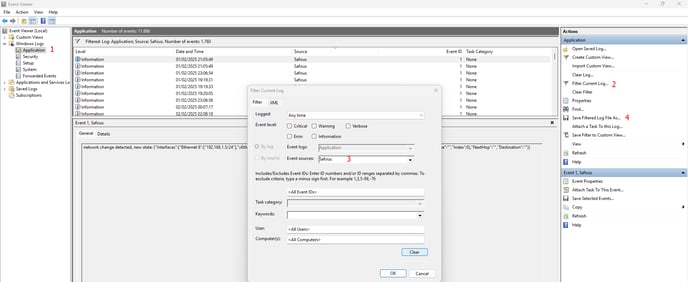
- Open Windows Event Viewer