User Permission
This section describes User Permission in the Admin Portal.
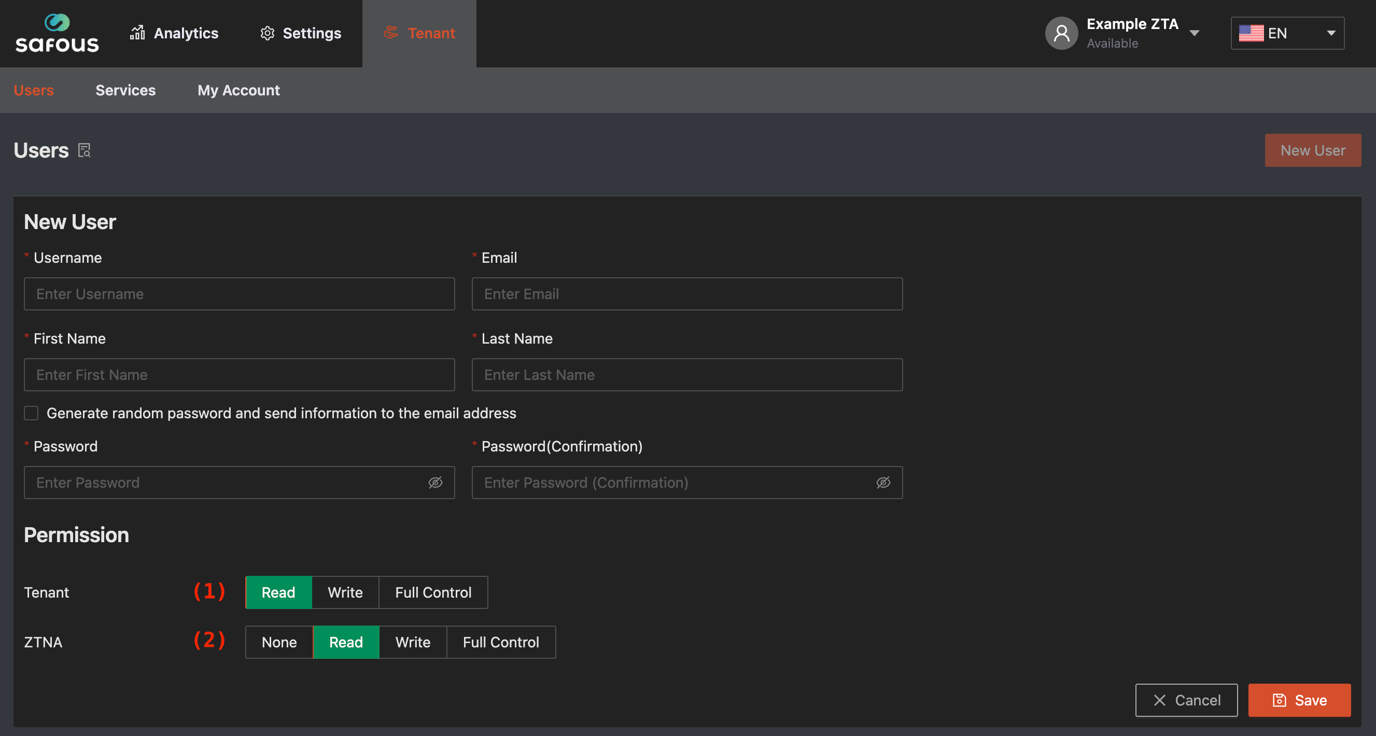
(1) Tenant Permission (2) Service Permission
Tenant Permissions
Tenant Permission has three Permissions. These Permissions restrict access to Tenant/Users. At least Read Permission is required.
- Read: Read only permission
- Write: Users can manage the following excluding own account
- Adding new user
- Updating the user
- Changing status of user
- Deleting the user
- Full Control: Users can manage the following
- Resetting enrollment
- Updating own account (Users need this permission to update to own account)
Service Permissions
Service permissions are privileges to each services or optional services. It is also possible to not grant permission.
- None: Not grant permission. Users cannot access this service.
- Read: Read only permission
- Write: Users can manage the following
- Adding
- Updating
- Changing status
- Deleting
- Full Control: Users can manage the following
- on Tenant/Services.
- Get Token (ZTA/PRA/I-SRA)
- on Settings/ZTA/Accounts/Users
- Reset Password
- Reset Enrollment
- on Analytics
- Terminate Session
- on Tenant/Services.