My Account
This article explains detailed configuration parameters of Tenant > My Account of the Safous admin portal (portal.safous.com)
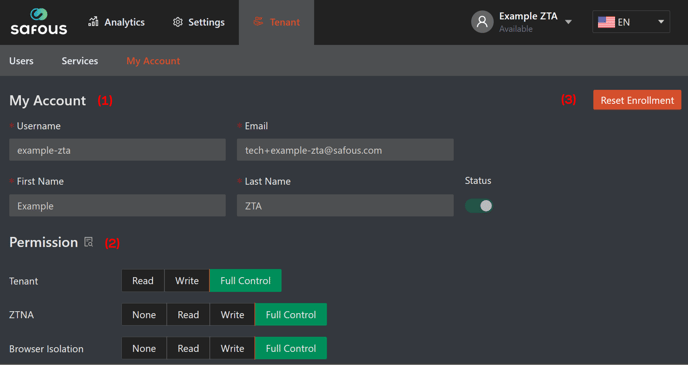
My Account page allows you to see your account's information as an administrator, and reset your account's MFA.
-
My Account, this section displays your account information consisting of username, email, first name, last name, and status (you cannot edit the information on this page).
-
Permission, this section displays permission assigned to your account (you cannot modify the permissions on this page):
-
Tenant, tenant permission has three permissions. These permissions restrict access to the administrator's accounts. At least read permission is required.
- Read: read only permission
- Write: the administrator can manage the following excluding own account:
- Adding new administrator
- Updating other administrator
- Changing status of other administrator
- Deleting the other administrator
- Full Control: users can manage the following
- Resetting enrollment
- Updating own account (Users need this permission to update to own account)
-
ZTNA and Browser Isolation, service permissions are privileges to each service. It is also possible to not grant permission at all (None).
- None: not grant permission (the administrator cannot access this service not even to view/read it).
- Read: read only permission
- Write: users can manage the following
- Adding
- Updating
- Changing status
- Deleting
- Full Control: Users can manage the following
- On Tenant/Services.
- Get Token (ZTNA/WAAP)
- Activate (Browser Isolation/WAAP)
- On Settings/ZTNA/Accounts/Users
- Reset Password
- Reset Enrollment
- On Analytics
- Terminate Session
- On Tenant/Services.
-
-
Reset Enrollment, click this button to reset/re-enroll the MFA for your administrator account.