Sites
Your company might have more than 1 office/data center and within the offices, there are various internal servers installed. Sites used to group App Gateways that have connections to these internal applications/servers.
Background
Sites represent the logical segmentation of the organization. Each site ought to contain at least 1 App Gateway that publishes resources from that site. This article explains the types of sites, how they are configured, and their relevance to the configuration of applications.
What Are Sites?
Sites have CIDRs (Classless Inter-Domain Routing) and DNSs (Domain Name System):
-
CIDRs represents IP addresses (e.g., 192.168.0.0/16), a network with a prefix of 16 bits that assigns individual addresses to devices on the network.
-
DNSs (Domain Name System) are hierarchical naming systems that resolve that name to the IP address.
In each site, Administrators can configure the CIDRs that the site publishes. This setting will be used every time a new application is added to determine the relevant site.
Administrators can also configure DNS suffixes and these are resolved through the site when the Safous Agent user tries to resolve them.
Page Overview
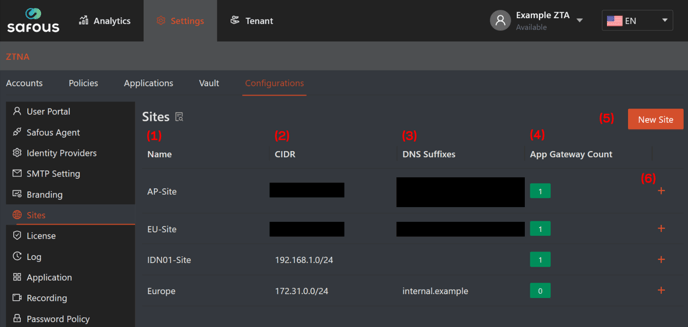
-
Name, this column shows the name of the site that is configured in the admin portal.
-
CIDR, this column shows the CIDR (Classless Inter-Domain Routing) or network subnet that will be directed to the site.
-
DNS Suffixes, this column shows the domain names that will be directed to the site.
-
App Gateway Count, this column shows the number of App Gateways that belong to the site.
-
New Site, this button is used to define a new site with the parameters explained below:

5.a) Name, fill this field with the name of your site (it can be the name of your office or data center.
5.b) DNS Domains, fill this field with domain names that will be directed to this site.
5.c) CIDR, fill this field with CIDR (Classless Inter-Domain Routing) or network subnet that will be directed to the site.
- + (plus) button, click this button to view/modify the existing site. Certain parameters will be shown for you to view/modify:
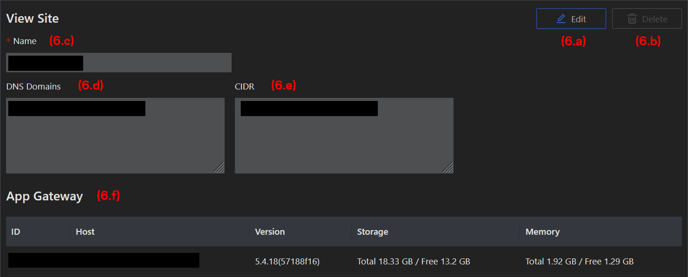
6.a) Edit, click this button to modify the configuration parameters
6.b) Delete, click this button to remove the site. To be able to remove the site, you need to terminate the App Gateways inside the site and delete all the site's configurations. The site needs to be empty to be removed.
6.c) Name, this field shows the name of your site.
6.d) DNS Domains, this field shows the domain name that is directed to the site.
6.e) CIDR, this field shows the CIDR (Classless Inter-Domain Routing) or network subnet that will be directed to the site.
Please do not forget to click the Save button after you add or modify anything.
Why Sites Matter?
For multiple site deployment, configuring sites can provide several benefits:
-
Determines the site of the application automatically when you add applications in the admin portal. After you enter an internal network address or domain in the application that belongs to the CIDR or domain configured on the sites page, the correct site is automatically chosen by Safous. This means that you would not need to manually select the correct site when creating an application.
-
Sites are used for redirecting to the correct site when accessing an application that is published on all sites with a dynamic internal address (personal desktop, for example).
-
Administrators have the flexibility to designate multiple sites for applications that are published by some, but not all, of the App Gateways.
Logs
The actions of adding, deleting, or editing sites are logged in the Admin Portal (Analytics > ZTNA > Audit Logs)