Activity Log
Activity logs manage and reflect all actions performed by users related to applications.
Below is an example of how activity log looks like and its explanation:
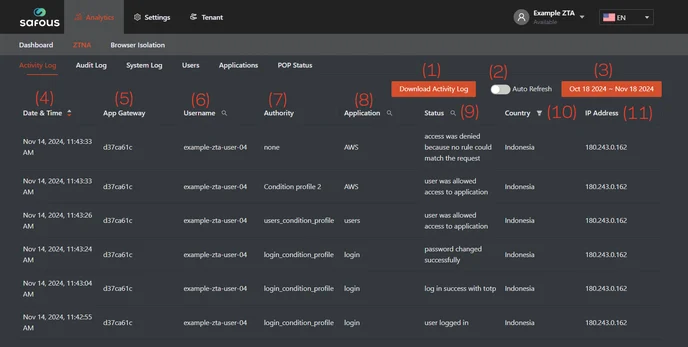
- Download Activity Log: Allows you to download activity logs in CSV or JSON format.
- Auto Refresh: Enables automatic refreshing of the logs displayed on the page.
- Log Time Period: Indicates the time period for the logs shown on the page.
- Date and Time: The timestamp of the event.
- App Gateway: The ID of the App Gateway where the event occurred.
- Username: The username that triggered the event.
- Authority: The policy name authorizing the event; can be either a system policy or a user-defined policy.
- Application: The name of the application involved in the event.
- Status: The outcome of the event (e.g., allowed/rejected, successful/unsuccessful authentication).
- Country: The detected country of the user based on IP geolocation.
- IP Address: The public IP address of the user.