Uninstall Safous Agent
This article provides step-by-step instructions for uninstalling the Safous agent.
There are several reasons why you may need to uninstall the Safous agent. For example, conflicts with Windows account privileges may prevent the agent from being installed successfully. You may also need to uninstall the agent if you no longer require network-based applications that depend on it. If any of these situations apply to you, follow the instructions below to uninstall the Safous agent.
-
Windows: Open the Run dialog box by pressing Win + R, type Appwiz.cpl, and press Enter to open Add/Remove Programs. Locate the Safous Agent and uninstall it. Alternatively, open the Control Panel, locate the Safous Agent, and select Uninstall.
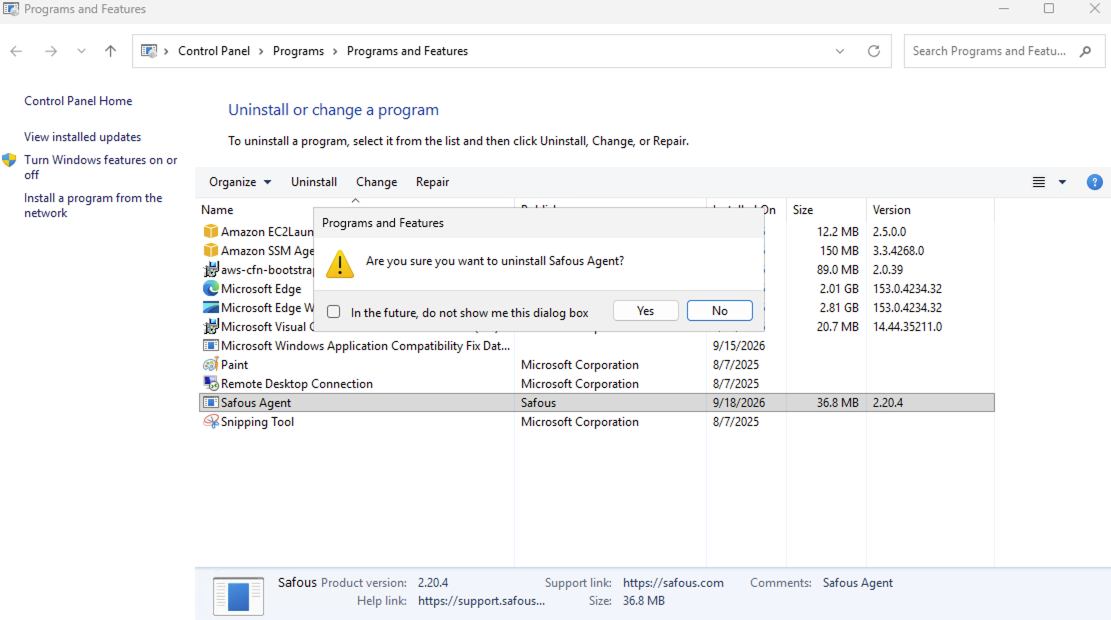
-
macOS: Use the following command to uninstall the agent:
sudo /Library/Application\ Support/cyolo/connect/connect uninstall
-
Linux: Use the following command to uninstall the agent:
sudo dpkg -r safous-connect
Uninstalling the Safous agent will disable network applications, SWG and device posture profile enforcement.