High Availability Setup in Safous Platform
Background
High availability (HA) is the ability of an application, service, orfunction to remain accessible when needed. Users experience disruptionswhen their data is unavailable or a system does not perform as expected.From the user's perspective, a failure in any component can result inthe same outcome: the service is unavailable.
High availability helps minimize service interruptions by allowing asystem to continue operating when individual components fail. In Safous,HA is achieved through multiple App Gateways operating in a cluster,with shared state, leader election, and data synchronization.
Key Terms
There are few key terms used when discussing the implementation of high availability solutions.
-
Tenant: A tenant is a dedicated environment for a company and its digital assets, including users, domains, applications, and configurations. Each tenant has administrators who can configure settings related to privileges and application access. A tenant has a unique login domain, for example,
https://login.tenant.gw.safous.com. Multiple tenants can exist within a Safous architecture, with each tenant having its own login and database. -
Clusters: A cluster is a group of nodes that operate together and coordinate their activities. In Safous, a cluster consists of a tenant with at least one App Gateway. A cluster can contain multiple sites, typically representing geographical locations where App Gateways have direct network access to published resources. Although a cluster can contain an odd or even number of App Gateways, at least three voting App Gateways are recommended for high availability.
-
Voters vs Non-Voters: App Gateways in a cluster may have different roles in the cluster's consensus and leader-election process. The number of voters is determined during implementation. For example, the first three App Gateways in a cluster may be designated as voters, while additional App Gateways may be configured as non-voters. Adding more App Gateways does not necessarily increase the voting quorum or the cluster's failure tolerance. The configured voter membership determines these characteristics.
- Voter: An App Gateway that participates in voting and contributes to the quorum required for leader election and cluster operations.
- Non-Voter: An App Gateway that can serve its assigned functions but does not participate in voting for the cluster leader.
-
Leaders vs Followers: A leader is elected by the voting App Gateways in the cluster. At a given time, a cluster has a leader for the relevant leadership function. Other App Gateways are followers for that function. Leadership can change when the cluster conducts a new election or when the current leader becomes unavailable. Only eligible voting App Gateways can become leaders.
-
Leader’s Responsibility for Data: There are 3 types of data in the Safous system:
- Log Data: Where system logs are written
- Application Data: Where applications, policies and identities are published
- Main Data: All other data within the Safous platform
At any given moment there is a leader for every type of data. The leader is the node that writes the above data to the database, and synchronizes the same data to the rest of the cluster’s App Gateways who are not in the lead at the time.
- Quorum: A quorum is the minimum number of voting nodes that must be available to form a majority and support consensus operations. A cluster needs more than half of its voting App Gateways to be online to keep the cluster working properly. Quorum is important because it helps prevent conflicting cluster decisions when nodes become disconnected.
For example:
- 2 voters: Both must be online.
- 3 voters: At least 2 must be online.
- 5 voters: At least 3 must be online.
- In simple terms, more than half of the voters must be available for the cluster to continue operating normally.
Safous High Availability Solution
HA in Safous functions when there are at least 3 App Gateways in the cluster. The 3 App Gateways are voters and vote on the leader. The leading App Gateway is responsible for writing the data noted above to the database while also updating the other App Gateways. Every 90 seconds there is a new leader vote and the role of the leader changes such that any one of the 3 App Gateways in a cluster can become one. If the leader becomes unavailable, one of the followers is elected to take the leadership position which means you can keep your systems running even if one of the components in the system fails. All applications, policies, enrollment of users, and connections to the system will continue to run within that cluster. In order for a cluster to survive, an odd number of voting App Gateways need to be functioning.
Raft consensus algorithm is used to ensure that the App Gateways are synchronized at any given moment, which means that when a leader fails, either one of the two followers can be elected leaders since they are all replicates of each other. The state is replicated globally regardless of the site affinity of App Gateways. In HA situations, systems run smoothly because any of the voters are elected as leaders should the latter fail.
HA can also be achieved if there is a cluster with 2 sites, and each site, i.e., Site A and Site B, each have two App Gateways, for a total of 4 App Gateways in the cluster. If the designated leader in Site A falls, the other 3 App Gateways (the remaining one in Site A and the 2 in Site B) can elect the new leader, provided that the two sites are clustered. Please note that there will be no site redundancy in Site A, but you can still be in read/write mode. And if the lead App Gateway in Site A falls, and the App Gateways in Site B cannot reach Site A, then the applications in Site A will be inaccessible.
Equally important is that applications might be affiliated with one specific site and that site might only have 1 App Gateway. If that 1 App Gateway fails, service to the applications published on that App Gateway will fail because the application is served only by that 1 App Gateway.
If there are 2 App Gateways at 1 site, one App Gateway is a voter and the other is a non-voter. Should the non-voting App Gateway fail, the system continues to work but without HA.
Why Is HA Important?
HA reduces interruptions and downtime. At times, emergencies will bring down even the most robust, reliable software and systems and HA systems minimize the impact of these events, and can often recover automatically from component or even server failures. When done properly deployed with 3 or more App Gateways, HA makes backups redundant by ensuring continuous operations and access to your systems, databases, and applications when and as needed. Unlike manual backups, HA structures orchestrate replicas in a distributed fashion so that users are never aware that that there was any systemic failure at all.
Disaster Recovery
Safous HA architecture offers you the ability to recover and restart from the point of a failure (resilience) and the ability to ensure that your applications are available for use in the event of system failure (performance). Because App Gateways share the same state, installing a new App Gateway from scratch as a replacement of a failed one will almost immediately keep the pace and start serving right away.
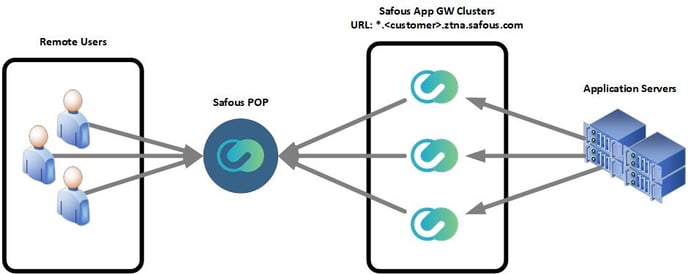
The diagram below demonstrates HA deployment topography in a customer premises situation:
Downtime Without HA
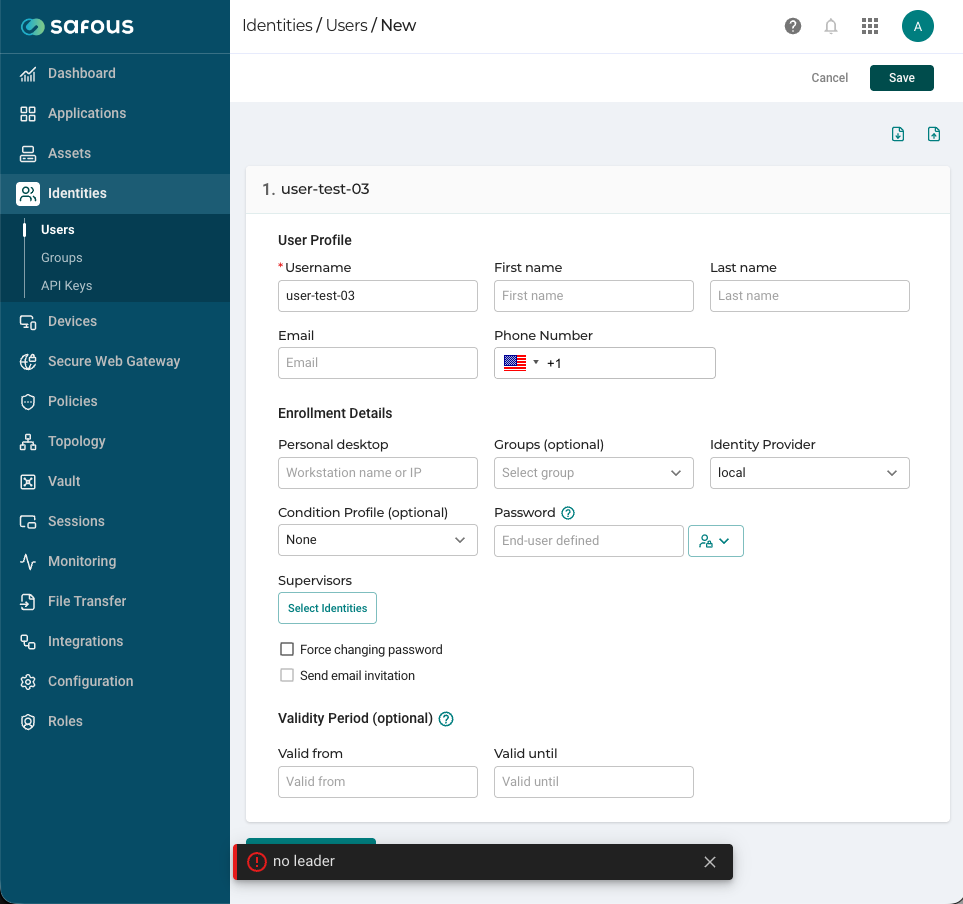
Consider this scenario: Only 2 App Gateways are installed in a cluster and the leader node dies, first of all and most importantly, all data is kept on the remaining follower node, so there is no data loss. There is indeed a simple procedure to convert the remaining follower node to the leader but it should be conducted only by Safous support. Until the cluster will be fixed, when a cluster has no leader (i.e., when the leader becomes unavailable), the cluster enters a "read-only" mode and there can't be configuration changes until the cluster is able to elect a leader again. If an administrator tries to configure the cluster at this stage he will get the no leader error message:
The logs will show:

For this reason we recommend installing a 3rd App Gateway in a cluster to achieve HA.
If the follower App Gateway crashes, the leader remains functioning so that if the two App Gateways are in the same site, the cluster will function as usual. But if these 2 App Gateways are in different sites, then the site that is covered by the fallen App Gateway will not have any applications accessible. A single server deployment is highly discouraged as data loss is inevitable in a failure scenario.
How to Deploy Safous HA
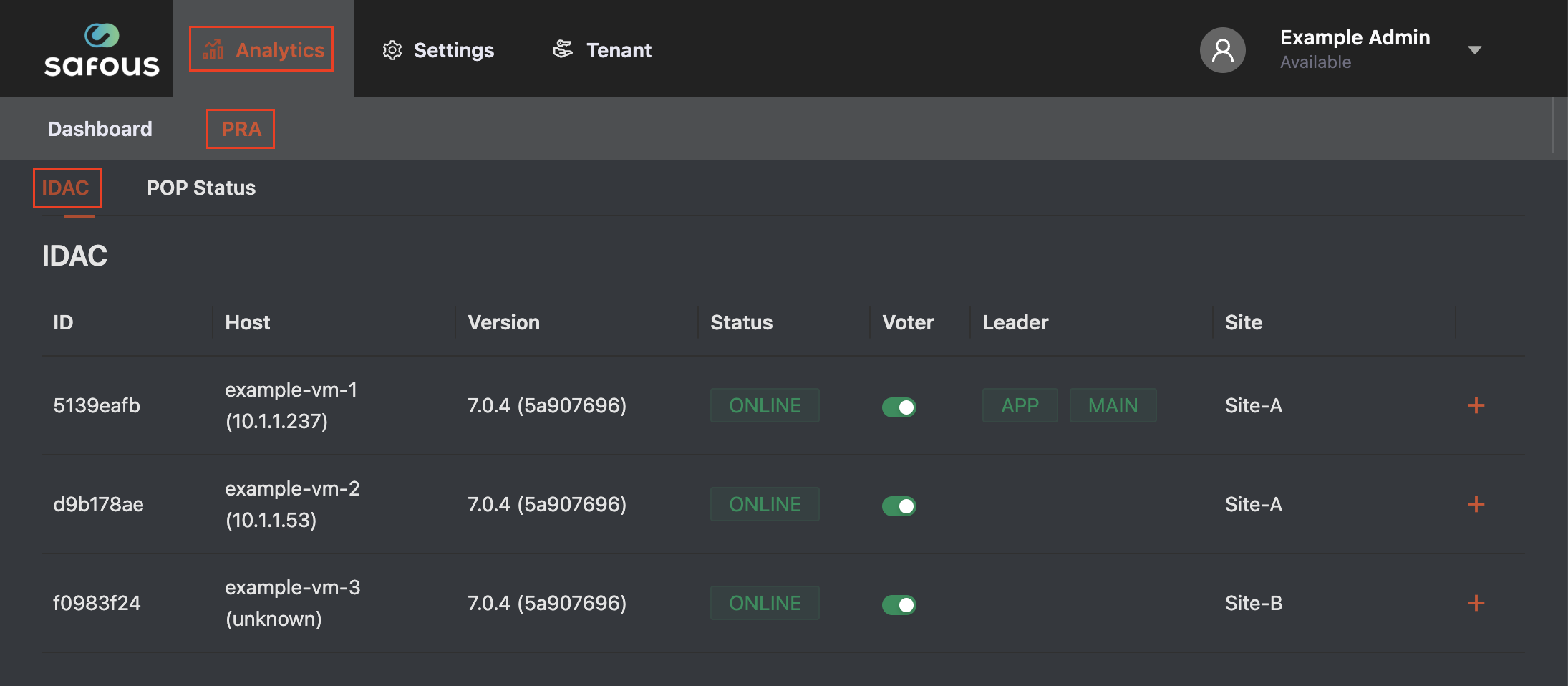
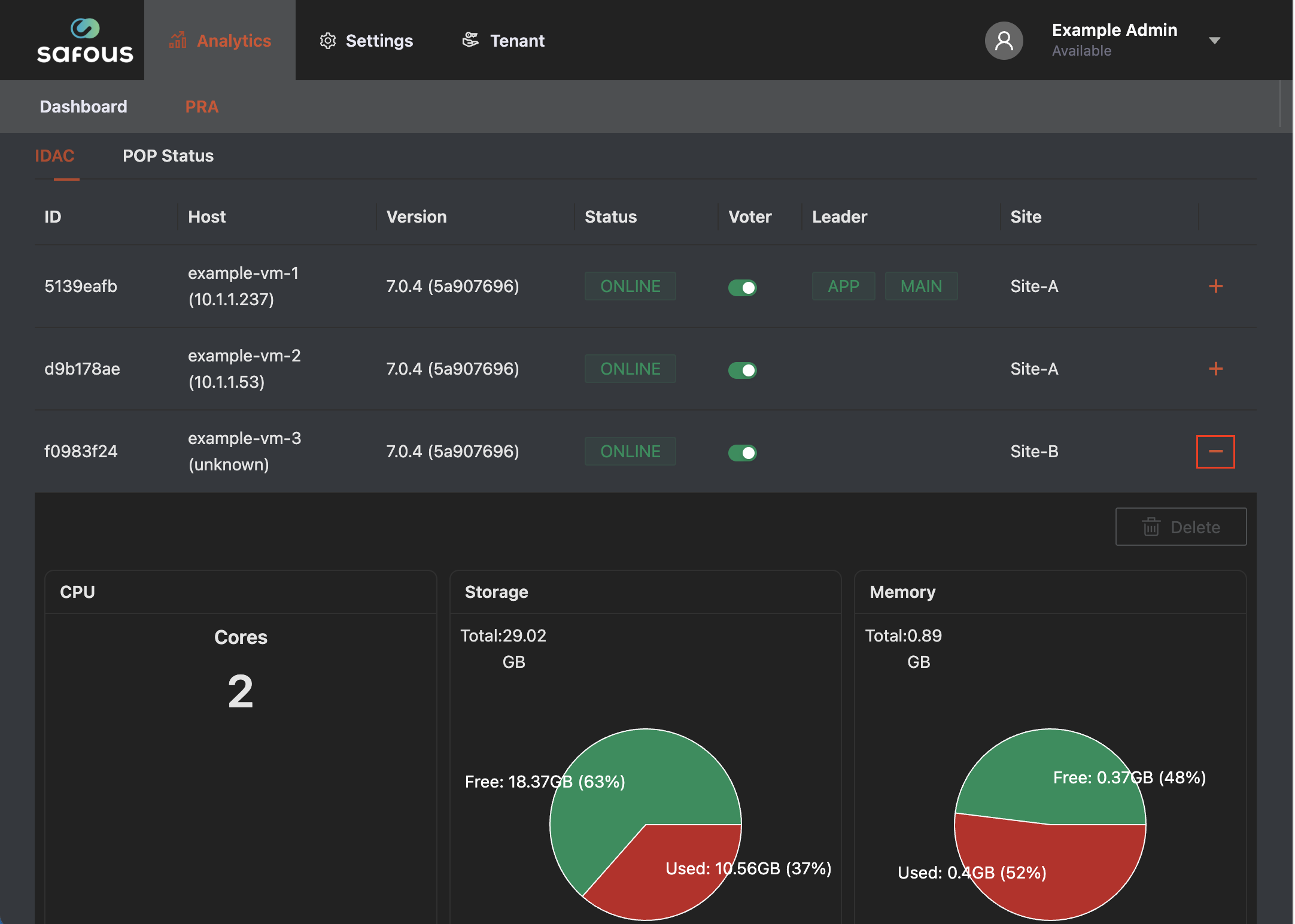
When you install your App Gateway, you specify the site it should represent as part of the installation process. Once the App Gateway is up and connected you will see its site name in the PRA Admin Portal:
Safous HA Best Practices
In general, HA describes systems that are dependable enough to operate continuously without failing. Safous places great emphasis on both resilience and performance as core concepts of Safous HA architecture best practices. Together, resilience and performance recover and restart from the point of a failure (resilience) and the ability to ensure that your applications are available for use in the event of system failure (performance). Here are our recommendations for HA best practices:
-
App Gateway Health Checks: One of the most important things in App Gateways resilience and performance is ensuring that they are healthy in order to execute the HA scenario. The reason for this is simple: If an application is available only from a specific site, and if the site is left without any healthy App Gateways, the site won't be available, no matter how many App Gateways you have. Accordingly it is important to ensure App Gateway health.
-
Uptime: Health checks are important because they relate to uptime, which defines that system's reliability and percentage of time it is ready for use. Degradation in the amount of healthy App Gateways that serve a specific service won't cause a degradation in performance of that service except cases when all App Gateways within a specific site are down. In that case , only the services published explicitly from that site will become unavailable. Recovery of failed App Gateway will immediately affect the availability.
-
Load Balancing: App Gateways within the same site share the load equally to ensure maximum performance for the expected load. Services that are published globally, without an affinity to site, are routed through the shortest path from the user, geographically.
-
Data Availability: App Gateways form shared states using a consensus algorithm which requires a quorum (majority) of healthy nodes in order to provide resiliency to faulty nodes. This means that planning of deployment of the Safous product should consider the formula App Gateways / 2 + 1 as the minimum amount of App Gateways that are needed to perform changes to configurations and sessions. A good example of deployment scenario quorum in relation to the number of servers can be seen below:
Site Servers Quorum Size Failure Tolerance 1 1 0 2 2 0 3 2 1 4 3 1 5 3 2 6 4 2 7 4 3 -
Disaster Recovery: Because the App Gateways share the same state, installing a new App Gateway from scratch, replacing a failed one, will almost immediately keep the pace and start serving your users.
Voter Configuration Best Practices
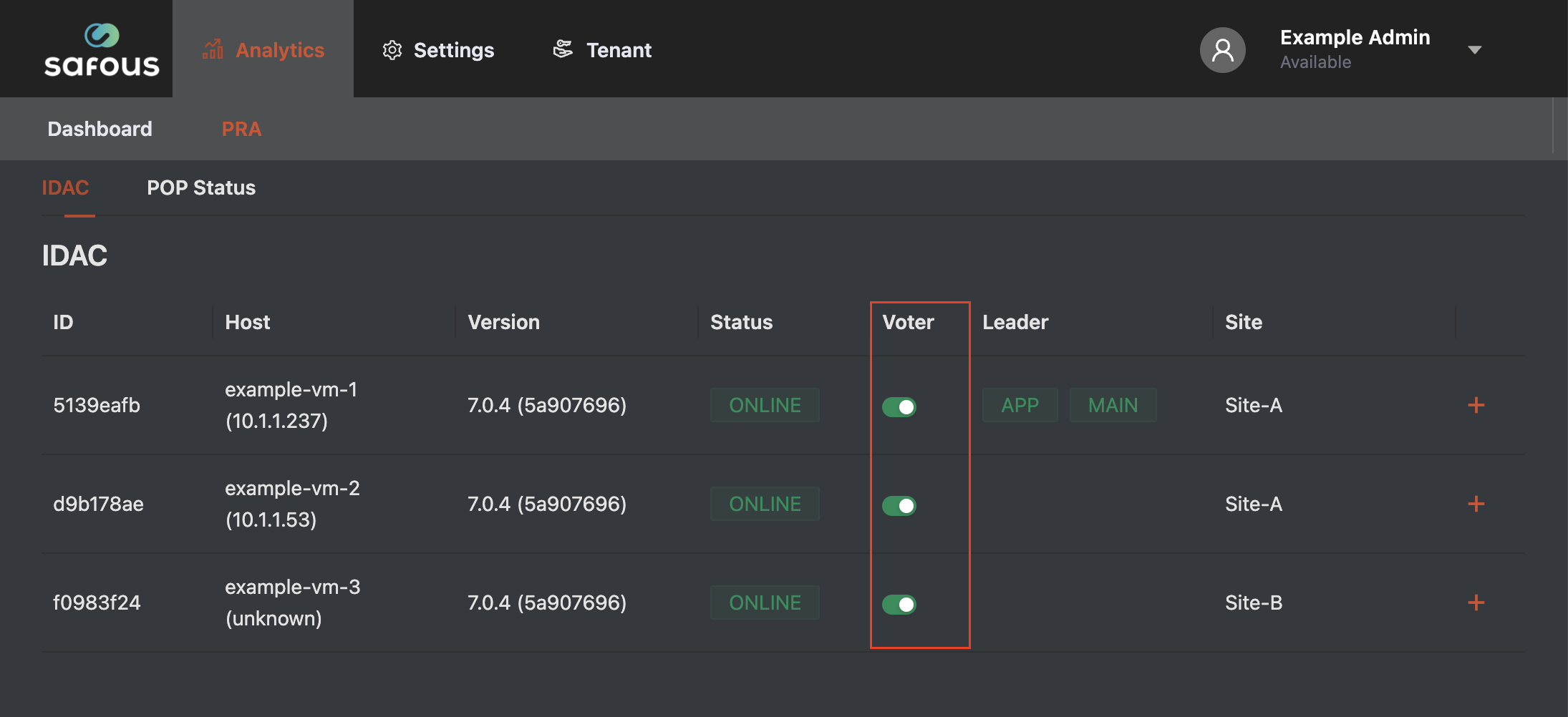
Voter configuration affects cluster availability, leader election, and quorum. The recommended configuration depends on the number of App Gateways in the cluster.
- Two App Gateways: Configure one App Gateway as a voter and the other as a non-voter. Avoid configuring two voters, as this can cause the cluster to become unavailable or enter read-only mode if one node fails.
- Three App Gateways: Configure all three App Gateways as voters to provide quorum-based fault tolerance. Alternatively, a single-voter configuration may be used where appropriate for the deployment requirements.
- Even number of voters: Avoid configuring an even number of voters, particularly two voters, as this may trigger an alert in the Admin Console and can affect cluster availability.
For production environments requiring high availability, three voting App Gateways are recommended. With three voters, the cluster can maintain quorum if one voter fails, provided the remaining nodes can communicate. Always verify the voter configuration and cluster health after changing voter membership.
System Roles and Storage Migration Best Practices
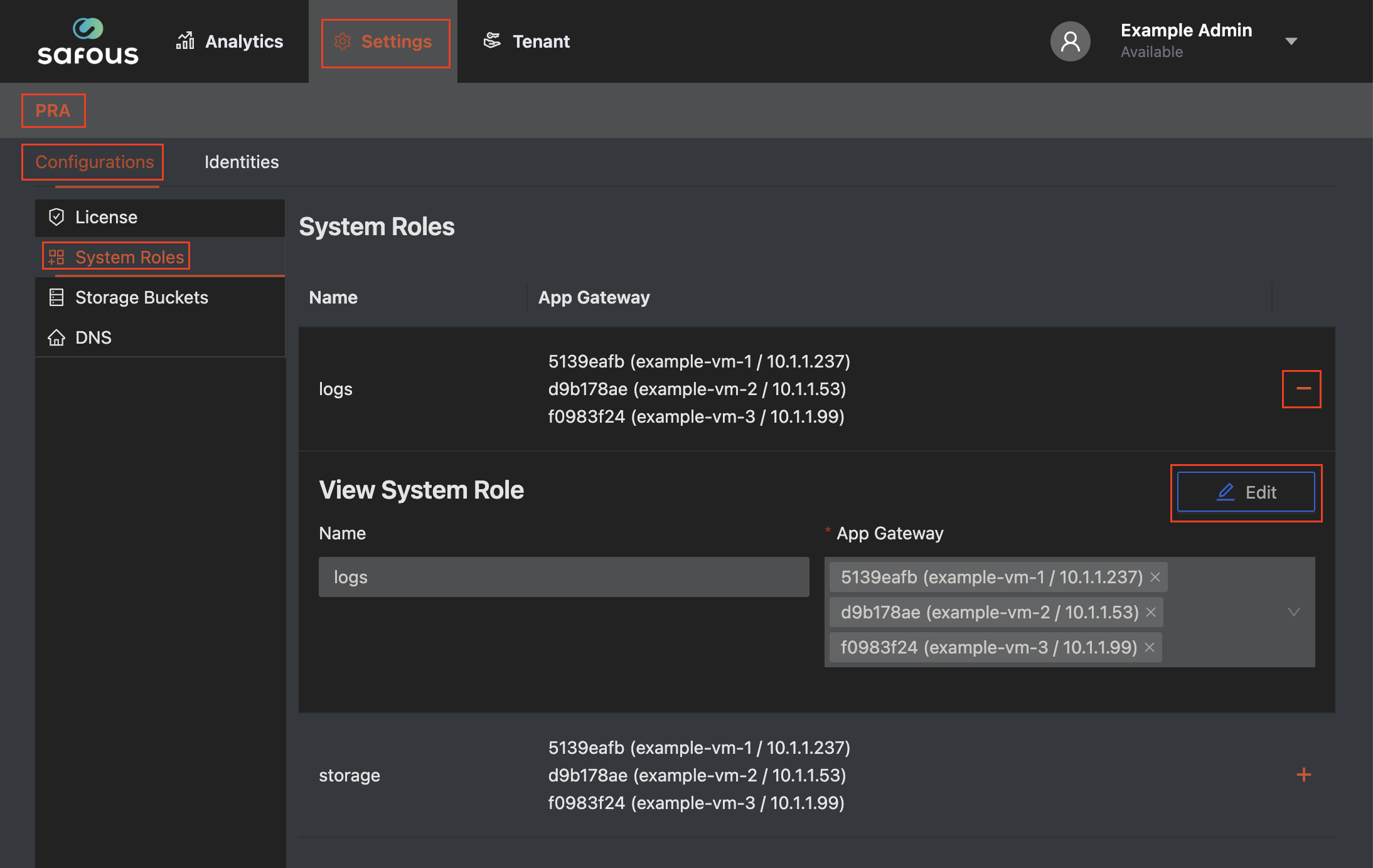
When changing Storage and Logs roles between App Gateways, allow sufficient time for existing logs and recording files to become available on the destination node. Environments with many recording files may require several minutes or longer.
For example, when migrating Storage and Logs roles from Node 1 to Node 2:
Initial configuration
- Node 1: Storage and Logs roles assigned.
- Node 2: No roles assigned.
Migration Procedure
- Assign the roles to Node 2. Add both Storage and Logs roles to Node 2 while keeping the roles on Node 1.
- Wait for synchronization. Allow sufficient time for existing data to become available on Node 2. The required time depends on the number and size of the files.
- Verify log data. Check the timestamps and available data under
/etc/cyolo/idac-logs.db.search/logson both nodes. - Verify recording files. Compare the number of files under
/blobson both nodes. - Confirm data consistency. Ensure that the destination node has the expected log data and recording files before proceeding. Matching timestamps and file counts are useful checks, but do not guarantee that all file contents are identical.
- Remove the roles from Node 1. Only proceed after verifying that the destination node is ready.
- Perform a final health check. Confirm that logs and recordings remain accessible and that the cluster is operating normally.
Important: Do not remove the Storage and Logs roles from the source node before verifying the destination. If synchronization is incomplete or the data does not match, retain the original roles and investigate before proceeding.
HA Maintenance for Administrators
The best way to maintain HA is to monitor the App Gateways' health. There is no specific way to check whether HA is working within the Admin Portal at this time, but this feature will be released in the future. In the meantime, if an App Gateway needs to be restarted, manually connect to the server and restart the docker-compose.
Troubleshooting FAQs
Some of the most commonly occurring issues in HA situations relate to the App Gateways themselves and are listed below.
-
Resources consumption issues: Disk space, memory or CPU
-
Network issues: App Gateways reaching the cloud, sync issues between App Gateways in the cluster.
-
Upgrade issues: Migrations, like changing the database schema or failing to download docker images.