Policies
The Policies section of the admin portal is a suite of options and features that can be configured to define granular controls on how and when end users can access published applications or resources.
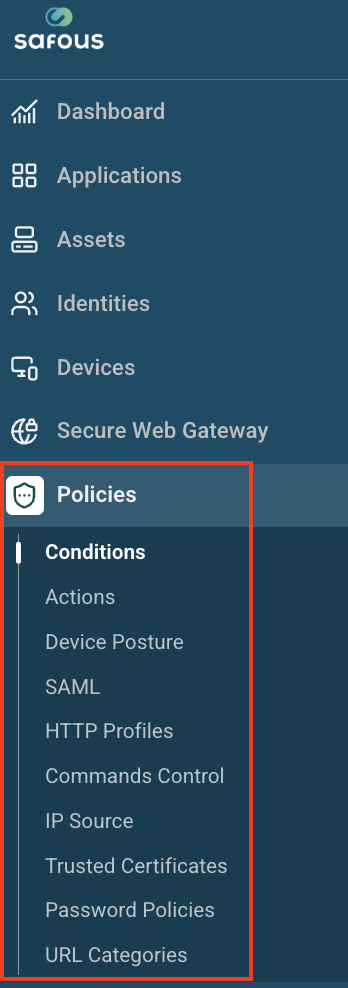
This article describes the options under Policies available to administrators on the Safous admin portal.
- Conditions: Allow administrators to set predefined conditions for application access. Conditions are defined in a profile, which is referenced in a rule when creating applications. For more information on Conditions, refer to the section: Policy Conditions.
- Actions: Allow administrators to define the actions that can be performed by a user after accessing applications. Similar to Conditions, Actions are defined in profiles. The parameters available in each profile differ according to the application type or protocol set within. For more information on Actions, refer to the section: Policy Actions.
- Device Posture: Device Postures are profiles with parameters that end-user devices must comply with before being granted access to applications. Portal admins can create multiple profiles. For more information on Device Posture, refer to the section: Device Posture
- SAML: Allows administrators to create SAML profiles with predefined or custom attributes as per requirements. For more information on SAML, refer to the section: SAML
- HTTP Profiles: Allows administrators to secure HTTP/HTTPS applications against web application security vulnerabilities and exploits using various application layer attack signatures. The signatures are defined in profiles. Administrators can not only enable or disable signatures defined in the default profile, they can create custom profiles with custom signatures to block attacks. Thereafter, the profiles are referenced in the Actions profiles. For more information on HTTP Profiles, refer to the section: HTTP Profiles
- Command Control: Allows administrators to add a list of allowed or denied commands. This feature can only be configured for SSH server applications. For more information on Command Control, refer to the section: Command Control
- IP Source: Allows administrators to create IP address objects, which can be used to allow or deny application access. The IP addresses can be in the form of individual IP addresses, ranges of addresses, or IP subnets. Information on how to configure IP Source is provided in the section: How to Create an IP Source.
- Trusted Certificates: This is the CA certificate store to be used to trust end-user device certificates in connecting devices. Administrators can import CA certificates on this page. The CA certificates imported here must be selected in the Require device certificate option in the Conditions profile on the Conditions page. Both private and public CA certificates can be imported on this page. For more information on Trusted Certificates, refer to the section: How to Create a Trusted Certificate
- Password Policies: Allows administrators to create local password policies that align with an organization's password standards. A default password policy is auto-created on this page. Portal admins can either edit the default policy or create custom password policies as required. Password policies are referenced in the Identity Provider Information option on the Integrations > Identity Providers page. For more information on Password Policies, refer to the section: How to Create a Password Policy.
- URL Categories: Allows administrators to create a logical grouping of URLs that they define. The URLs that belong to this category then can be set to be blocked or bypassed from SWG inspection. For more information on URL Categories, please refer to section: URL Categories